

Note
Go to the end to download the full example code.
Custom Pipeline#
This example demonstrates how to customize the event execution pipeline using YAML configuration. Custom pipelines let you reorder events, add custom events, or remove built-in events.
You’ll learn to:
Understand the default pipeline structure
Create custom pipeline YAML files
Use special syntax (repetition)
Add custom events to the pipeline
Load and execute custom pipelines
What is the Pipeline?#
The pipeline defines which events execute each period and in what order. BAM Engine’s default pipeline has 8 phases:
Planning: Production targets, pricing
Labor Market: Job search and hiring
Credit Market: Loan applications and provision
Production: Wage payments, production
Goods Market: Shopping and consumption
Revenue: Sales revenue, debt repayment
Bankruptcy: Insolvency detection and exit
Entry: New firms/banks spawning
import tempfile
from pathlib import Path

import bamengine as bam

# Initialize simulation
sim = bam.Simulation.init(n_firms=50, n_households=250, seed=42)

print("Default pipeline has events like:")
print("  - firms_decide_desired_production")
print("  - labor_market_round (repeated max_M times)")
print("  - goods_market_round")
Default pipeline has events like:
  - firms_decide_desired_production
  - labor_market_round (repeated max_M times)
  - goods_market_round
Pipeline YAML Syntax#
Pipelines are defined in YAML with special syntax:
Simple event: - event_name
- Repeated event:
- event_name x N Executes event N times
- Parameter substitution:
{max_M},{max_H} Replaced with config values at load time
# Example pipeline YAML structure
example_yaml = """
events:
  # Simple events
  - firms_decide_desired_production
  - firms_plan_breakeven_price
  - firms_plan_price

  # Batch shopping (handles all Z visits internally)
  - goods_market_round

  # Repeated batch matching (max_M rounds of labor market)
  - labor_market_round x {max_M}
"""

print("\nExample pipeline YAML:")
print(example_yaml)
Example pipeline YAML:

events:
  # Simple events
  - firms_decide_desired_production
  - firms_plan_breakeven_price
  - firms_plan_price

  # Batch shopping (handles all Z visits internally)
  - goods_market_round

  # Repeated batch matching (max_M rounds of labor market)
  - labor_market_round x {max_M}
Creating a Custom Pipeline#
Create a minimal pipeline for testing that skips unnecessary events.
# Minimal pipeline: just planning, production, and stats
minimal_pipeline = """
# Minimal pipeline for testing
# Skips labor market, credit market, goods market

events:
  # Planning phase
  - firms_decide_desired_production
  - firms_plan_breakeven_price
  - firms_plan_price
  - update_avg_mkt_price

  # Skip labor/credit/goods markets for speed

  # Production (simplified)
  - firms_run_production
"""

# Write to temp file
config_dir = Path(tempfile.mkdtemp())
pipeline_path = config_dir / "minimal_pipeline.yml"
pipeline_path.write_text(minimal_pipeline)

print(f"Created minimal pipeline at: {pipeline_path}")

# Load and run with custom pipeline
sim_minimal = bam.Simulation.init(
    n_firms=50,
    n_households=250,
    seed=42,
    pipeline_path=str(pipeline_path),
)

print("\nRunning with minimal pipeline...")
sim_minimal.run(n_periods=10)
print("Completed 10 periods")
Created minimal pipeline at: /tmp/tmpv27w072e/minimal_pipeline.yml

Running with minimal pipeline...
Completed 10 periods
Removing Events#
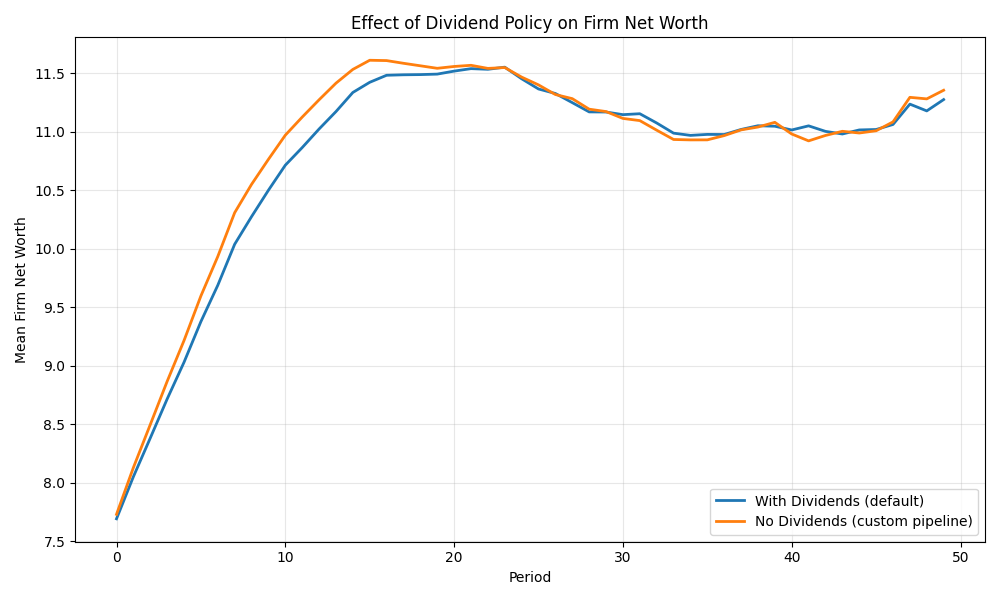
Create a pipeline without dividends (all profits retained).
When removing events, you may need to add a replacement that handles
any required state updates. Here we remove firms_pay_dividends and
add a custom event to set retained_profit = net_profit.
from bamengine import event, ops


@event
class RetainAllProfits:
    """Custom event that retains all profits (no dividends).

    This replaces firms_pay_dividends - it sets retained_profit to net_profit
    so that firms_update_net_worth can add it to net worth.
    """

    def execute(self, sim):
        bor = sim.get_role("Borrower")
        # All net profit is retained (no dividends paid)
        bor.retained_profit[:] = bor.net_profit


no_dividends_pipeline = """
# Pipeline without dividend payments
# Firms retain all profits via custom RetainAllProfits event

events:
  # Planning
  - firms_decide_desired_production
  - firms_plan_breakeven_price
  - firms_plan_price
  - firms_decide_desired_labor
  - firms_decide_vacancies
  - firms_fire_excess_workers

  # Labor market
  - calc_inflation_rate
  - adjust_minimum_wage
  - firms_decide_wage_offer
  - workers_decide_firms_to_apply
  - labor_market_round x {max_M}
  - firms_calc_wage_bill

  # Credit market
  - banks_decide_credit_supply
  - banks_decide_interest_rate
  - firms_decide_credit_demand
  - firms_calc_financial_fragility
  - firms_prepare_loan_applications
  - credit_market_round x {max_H}
  - firms_fire_workers

  # Production
  - firms_pay_wages
  - workers_receive_wage
  - firms_run_production
  - update_avg_mkt_price
  - workers_update_contracts

  # Goods market
  - consumers_calc_propensity
  - consumers_decide_income_to_spend
  - consumers_decide_firms_to_visit
  - goods_market_round
  - consumers_finalize_purchases

  # Revenue (custom event replaces dividends)
  - firms_collect_revenue
  - firms_validate_debt_commitments
  - retain_all_profits  # CUSTOM: replaces firms_pay_dividends

  # Bankruptcy
  - firms_update_net_worth
  - mark_bankrupt_firms
  - mark_bankrupt_banks

  # Entry
  - spawn_replacement_firms
  - spawn_replacement_banks
"""

# Write and test
no_div_path = config_dir / "no_dividends_pipeline.yml"
no_div_path.write_text(no_dividends_pipeline)

print("Created pipeline without dividends")

# Compare with and without dividends
import matplotlib.pyplot as plt

# Default pipeline (with dividends)
sim_with_div = bam.Simulation.init(n_firms=100, n_households=500, seed=42)
borr_with_div = sim_with_div.get_role("Borrower")
nw_with_div = []
for _ in range(50):
    sim_with_div.step()
    nw_with_div.append(bam.ops.mean(borr_with_div.net_worth))

# Custom pipeline (no dividends)
sim_no_div = bam.Simulation.init(
    n_firms=100,
    n_households=500,
    seed=42,
    pipeline_path=str(no_div_path),
)
borr_no_div = sim_no_div.get_role("Borrower")
nw_no_div = []
for _ in range(50):
    sim_no_div.step()
    nw_no_div.append(bam.ops.mean(borr_no_div.net_worth))

# Plot comparison
fig, ax = plt.subplots(figsize=(10, 6))
ax.plot(nw_with_div, label="With Dividends (default)", linewidth=2)
ax.plot(nw_no_div, label="No Dividends (custom pipeline)", linewidth=2)
ax.set_xlabel("Period")
ax.set_ylabel("Mean Firm Net Worth")
ax.set_title("Effect of Dividend Policy on Firm Net Worth")
ax.legend()
ax.grid(True, alpha=0.3)
plt.tight_layout()
plt.show()

print("\nFinal mean net worth:")
print(f"  With dividends: {nw_with_div[-1]:.2f}")
print(f"  No dividends: {nw_no_div[-1]:.2f}")
Created pipeline without dividends

Final mean net worth:
  With dividends: 11.24
  No dividends: 11.34
Adding Custom Events#
Define custom events and add them to the pipeline.
from bamengine import event


@event
class CollectSalesTax:
    """Collect sales tax from firm revenue."""

    def execute(self, sim):
        prod = sim.get_role("Producer")
        borr = sim.get_role("Borrower")

        # 5% sales tax on revenue
        tax_rate = 0.05
        # Approximate revenue as production * price
        revenue = ops.multiply(prod.production, prod.price)
        tax = ops.multiply(revenue, tax_rate)

        # Reduce net worth by tax
        borr.net_worth[:] = borr.net_worth - tax


@event
class PayUnemploymentBenefits:
    """Pay unemployment benefits to jobless workers."""

    def execute(self, sim):
        wrk = sim.get_role("Worker")
        cons = sim.get_role("Consumer")

        # Benefit = 40% of minimum wage for unemployed
        benefit = sim.ec.min_wage * 0.4
        unemployed = wrk.employer < 0

        # Add to consumer income
        cons.income[:] = cons.income + ops.where(unemployed, benefit, 0.0)


print("\nCustom events defined:")
print("  - collect_sales_tax")
print("  - pay_unemployment_benefits")

# Pipeline with custom events
custom_events_pipeline = """
# Pipeline with custom tax and benefits

events:
  # Planning
  - firms_decide_desired_production
  - firms_plan_breakeven_price
  - firms_plan_price
  - firms_decide_desired_labor
  - firms_decide_vacancies
  - firms_fire_excess_workers

  # Labor market
  - calc_inflation_rate
  - adjust_minimum_wage
  - firms_decide_wage_offer
  - workers_decide_firms_to_apply
  - labor_market_round x {max_M}
  - firms_calc_wage_bill

  # Credit market
  - banks_decide_credit_supply
  - banks_decide_interest_rate
  - firms_decide_credit_demand
  - firms_calc_financial_fragility
  - firms_prepare_loan_applications
  - credit_market_round x {max_H}
  - firms_fire_workers

  # Production
  - firms_pay_wages
  - workers_receive_wage
  - firms_run_production
  - update_avg_mkt_price
  - workers_update_contracts

  # CUSTOM: Unemployment benefits (after wage receipt)
  - pay_unemployment_benefits

  # Goods market
  - consumers_calc_propensity
  - consumers_decide_income_to_spend
  - consumers_decide_firms_to_visit
  - goods_market_round
  - consumers_finalize_purchases

  # Revenue
  - firms_collect_revenue

  # CUSTOM: Sales tax (after revenue collection)
  - collect_sales_tax

  - firms_validate_debt_commitments
  - firms_pay_dividends

  # Bankruptcy
  - firms_update_net_worth
  - mark_bankrupt_firms
  - mark_bankrupt_banks

  # Entry
  - spawn_replacement_firms
  - spawn_replacement_banks
"""

custom_path = config_dir / "custom_events_pipeline.yml"
custom_path.write_text(custom_events_pipeline)

# Run with custom events
sim_custom = bam.Simulation.init(
    n_firms=100,
    n_households=500,
    seed=42,
    pipeline_path=str(custom_path),
)

print("\nRunning with custom events pipeline...")
sim_custom.run(n_periods=30)
print("Completed 30 periods with tax and benefits")
# Calculate unemployment from Worker.employed (calc_unemployment_rate deprecated)
wrk_custom = sim_custom.get_role("Worker")
unemployment_custom = 1 - bam.ops.mean(wrk_custom.employed.astype(float))
print(f"Final unemployment: {unemployment_custom:.2%}")
Custom events defined:
  - collect_sales_tax
  - pay_unemployment_benefits

Running with custom events pipeline...
Completed 30 periods with tax and benefits
Final unemployment: 0.00%
Batch Market Events#
Market matching uses batch events that handle both sides of the market
(applications and matching) in a single vectorized step per round.
The x N repetition syntax runs multiple rounds.
batch_explanation = """
Repetition syntax: event_name x N

For N=4, the event executes 4 times:
  1. event_name (round 0)
  2. event_name (round 1)
  3. event_name (round 2)
  4. event_name (round 3)

Used in BAM for:
  - Labor market: labor_market_round x {max_M}
  - Credit market: credit_market_round x {max_H}
  - Goods market: goods_market_round (single event, handles all Z visits internally)
"""
print(batch_explanation)
Repetition syntax: event_name x N

For N=4, the event executes 4 times:
  1. event_name (round 0)
  2. event_name (round 1)
  3. event_name (round 2)
  4. event_name (round 3)

Used in BAM for:
  - Labor market: labor_market_round x {max_M}
  - Credit market: credit_market_round x {max_H}
  - Goods market: goods_market_round (single event, handles all Z visits internally)
Parameter Substitution#
Use {param_name} in pipeline YAML to substitute config values.
param_example = """
# Available parameters:
#   {max_M} - Labor market matching rounds per period
#   {max_H} - Credit market matching rounds per period

events:
  # 4 rounds of labor market matching
  - labor_market_round x {max_M}

  # 2 rounds of credit market matching
  - credit_market_round x {max_H}

  # Batch-sequential shopping (handles all Z visits internally)
  - goods_market_round

# The actual values come from:
#   - defaults.yml (max_M: 4, max_H: 2, max_Z: 2)
#   - Or your custom config
"""
print("Parameter substitution in pipelines:")
print(param_example)

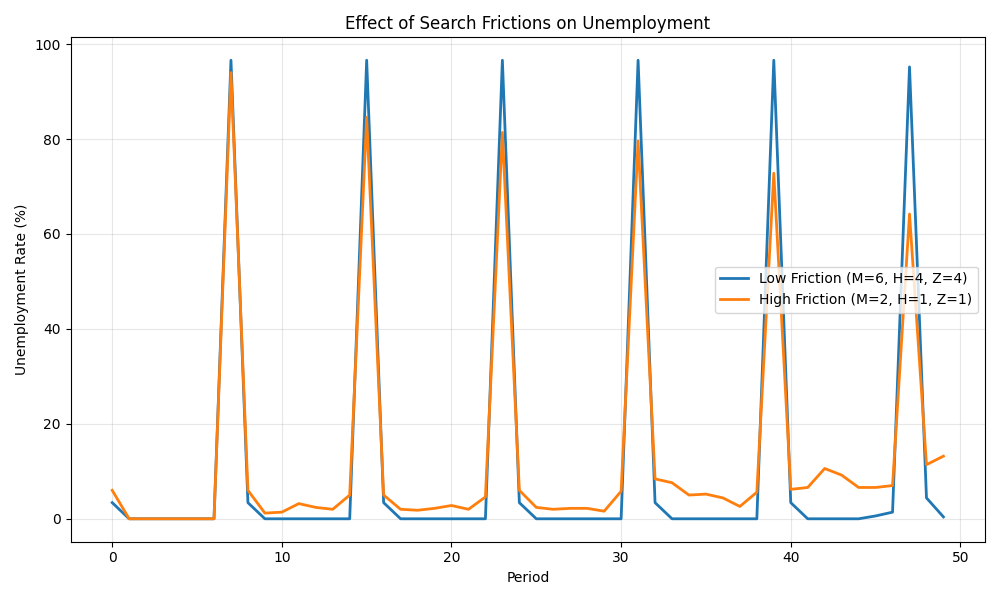
# Test with different friction values
# Uses default pipeline - the key difference is in max_M, max_H, max_Z config parameters

# Low friction (many search rounds)
sim_low_friction = bam.Simulation.init(
    n_firms=100,
    n_households=500,
    max_M=6,
    max_H=4,
    max_Z=4,  # More search rounds
    seed=42,
)

# High friction (few search rounds)
sim_high_friction = bam.Simulation.init(
    n_firms=100,
    n_households=500,
    max_M=2,
    max_H=1,
    max_Z=1,  # Fewer rounds
    seed=42,
)

# Run both
n_periods = 50
unemp_low = []
unemp_high = []

# Get worker roles for unemployment calculation
wrk_low = sim_low_friction.get_role("Worker")
wrk_high = sim_high_friction.get_role("Worker")

for _ in range(n_periods):
    sim_low_friction.step()
    sim_high_friction.step()
    # Calculate unemployment from Worker.employed (calc_unemployment_rate deprecated)
    unemp_low.append(1 - bam.ops.mean(wrk_low.employed.astype(float)))
    unemp_high.append(1 - bam.ops.mean(wrk_high.employed.astype(float)))

# Plot
fig, ax = plt.subplots(figsize=(10, 6))
ax.plot(
    bam.ops.multiply(bam.ops.asarray(unemp_low), 100),
    label="Low Friction (M=6, H=4, Z=4)",
    linewidth=2,
)
ax.plot(
    bam.ops.multiply(bam.ops.asarray(unemp_high), 100),
    label="High Friction (M=2, H=1, Z=1)",
    linewidth=2,
)
ax.set_xlabel("Period")
ax.set_ylabel("Unemployment Rate (%)")
ax.set_title("Effect of Search Frictions on Unemployment")
ax.legend()
ax.grid(True, alpha=0.3)
plt.tight_layout()
plt.show()
Parameter substitution in pipelines:

# Available parameters:
#   {max_M} - Labor market matching rounds per period
#   {max_H} - Credit market matching rounds per period

events:
  # 4 rounds of labor market matching
  - labor_market_round x {max_M}

  # 2 rounds of credit market matching
  - credit_market_round x {max_H}

  # Batch-sequential shopping (handles all Z visits internally)
  - goods_market_round

# The actual values come from:
#   - defaults.yml (max_M: 4, max_H: 2, max_Z: 2)
#   - Or your custom config
Cleanup#
import shutil

shutil.rmtree(config_dir)
print("\nTemp files cleaned up.")
Temp files cleaned up.
Key Takeaways#
Pipelines define event execution order
Use YAML format with
events:listSpecial syntax:
x Nfor repetitionParameter substitution:
{max_M},{max_H}Remove events by commenting/deleting from YAML
Add custom events by defining with
@eventand including in YAMLLoad via
pipeline_pathparameter inSimulation.init()
Total running time of the script: (0 minutes 3.028 seconds)