

Note
Go to the end to download the full example code.
Simulation Results#
This example demonstrates how to collect and analyze simulation results
using the SimulationResults class. Learn how to:
Collect data during simulation runs
Access data via
results["Producer.price"]orresults.Producer.priceUse
results.get()for programmatic access with optional aggregationUse
results.available()to discover collected variablesExport data to pandas DataFrames
Generate summary statistics
The results module makes it easy to extract insights from simulations without manual data collection.
Basic Data Collection#
Pass collect=True to sim.run() to collect data automatically.
This returns a SimulationResults object containing time series data.
import numpy as np

import bamengine as bam

# Run simulation with data collection
# We collect Worker employed data without aggregation to calculate unemployment
sim = bam.Simulation.init(n_firms=100, n_households=500, seed=42)
results = sim.run(
    n_periods=50,
    collect={
        "Producer": True,
        "Worker": ["employed"],  # Boolean employed status for each worker
        "Employer": True,
        "Borrower": True,
        "Lender": True,
        "Consumer": True,
        # Capture timing: when to snapshot each variable during the period
        # Worker.employed should be captured after production runs (steady state)
        "capture_timing": {
            "Worker.employed": "firms_run_production",
        },
    },
)

print(f"Collected results: {results}")
print("\nMetadata:")
print(f"  Periods simulated: {results.metadata.get('n_periods', 'N/A')}")
print(f"  Firms: {results.metadata.get('n_firms', 'N/A')}")
print(f"  Households: {results.metadata.get('n_households', 'N/A')}")
Collected results: SimulationResults(periods=50, firms=100, households=500, roles=[Worker, Producer, Employer, Borrower, Lender, Consumer], relationships=[None])

Metadata:
  Periods simulated: 50
  Firms: 100
  Households: 500
Discovering Available Data#
Use results.available() to list all collected variables as
"Name.variable" strings.
All available data:
  Borrower.credit_demand
  Borrower.gross_profit
  Borrower.loan_apps_head
  Borrower.loan_apps_targets
  Borrower.net_profit
  Borrower.net_worth
  Borrower.projected_fragility
  Borrower.retained_profit
  Borrower.total_funds
  Borrower.wage_bill
  Consumer.income
  Consumer.income_to_spend
  Consumer.largest_prod_prev
  Consumer.propensity
  Consumer.savings
  Consumer.shop_visits_head
  Consumer.shop_visits_targets
  Economy.avg_price
  Economy.inflation
  Economy.n_bank_bankruptcies
  Economy.n_firm_bankruptcies
  Employer.current_labor
  Employer.desired_labor
  Employer.n_vacancies
  Employer.total_funds
  Employer.wage_bill
  Employer.wage_offer
  Employer.wage_shock
  Lender.credit_supply
  Lender.equity_base
  Lender.interest_rate
  Lender.opex_shock
  Producer.breakeven_price
  Producer.desired_production
  Producer.expected_demand
  Producer.inventory
  Producer.labor_productivity
  Producer.price
  Producer.price_shock
  Producer.prod_mask_dn
  Producer.prod_mask_up
  Producer.prod_shock
  Producer.production
  Producer.production_prev
  Worker.employed
Primary Data Access#
The primary API uses bracket notation results["Name.variable"]
or attribute access results.Name.variable. Economy metrics are
always collected automatically (no need to request them).
# Bracket access (recommended for most use cases)
avg_price = results["Economy.avg_price"]
inflation = results["Economy.inflation"]

# Attribute access (convenient for interactive exploration)
avg_price_attr = results.Economy.avg_price
print(f"\nAverage price (bracket): {bam.ops.mean(avg_price):.3f}")
print(f"Average price (attr):   {bam.ops.mean(avg_price_attr):.3f}")

# Role data works the same way
worker_employed = results["Worker.employed"]
print(f"Worker employed shape:  {worker_employed.shape}")


# Helper function to calculate unemployment rate from Worker employed data
def calc_unemployment_rate(worker_employed: np.ndarray) -> np.ndarray:
    """Calculate unemployment rate per period from Worker employed boolean array.

    Args:
        worker_employed: 2D boolean array of shape (n_periods, n_workers) where
            True indicates employed, False indicates unemployed.

    Returns:
        1D array of unemployment rates per period.
    """
    # Employment rate = mean of employed (True=1, False=0) across workers
    # Unemployment rate = 1 - employment rate
    return 1.0 - np.mean(worker_employed.astype(float), axis=1)


# Calculate unemployment rate from Worker employed data
unemployment = calc_unemployment_rate(worker_employed)
print("\nUnemployment rate:")
print(f"  Mean: {bam.ops.mean(unemployment):.2%}")
print(f"  Final: {unemployment[-1]:.2%}")

print("\nAverage price:")
print(f"  Mean: {bam.ops.mean(avg_price):.3f}")
print(f"  Final: {avg_price[-1]:.3f}")
Average price (bracket): 0.591
Average price (attr):   0.591
Worker employed shape:  (50, 500)

Unemployment rate:
  Mean: 0.20%
  Final: 0.00%

Average price:
  Mean: 0.591
  Final: 0.761
Accessing Role Data#
Role data contains per-period snapshots of agent states. With dict-form collect, data is full per-agent arrays (periods x agents) by default.
# Access Producer price data - shape is (periods, firms) with full per-agent data
price_data = results["Producer.price"]
print(f"Price data shape: {price_data.shape}")
# Calculate mean price per period
avg_prices = np.mean(price_data, axis=1)
print(f"Price trend (first 5): {avg_prices[:5].round(3)}")
Price data shape: (50, 100)
Price trend (first 5): [0.503 0.503 0.503 0.503 0.502]
Programmatic Access with get()#
Use results.get() for programmatic access, especially when the role
or variable name comes from a variable. It also supports on-the-fly
aggregation.
# get() for role data
prices_via_get = results.get("Producer", "price")
print("\nUsing get():")
print(f"  results.get('Producer', 'price').shape: {prices_via_get.shape}")

# get() for economy data - use "Economy" as the name
price_via_get = results.get("Economy", "avg_price")
print(f"  results.get('Economy', 'avg_price').shape: {price_via_get.shape}")

# Aggregation on-the-fly (useful when you have full per-agent data)
full_data_sim = bam.Simulation.init(n_firms=50, n_households=250, seed=42)
full_data_results = full_data_sim.run(
    n_periods=20,
    collect={
        "Producer": ["price"],  # Specific variables for Producer
    },
)

# Get full 2D data (periods x firms)
prices_2d = full_data_results.get("Producer", "price")
print(f"\n  Full data shape: {prices_2d.shape}")

# Get mean aggregated on-the-fly
prices_mean = full_data_results.get("Producer", "price", aggregate="mean")
print(f"  With aggregate='mean': {prices_mean.shape}")
Using get():
  results.get('Producer', 'price').shape: (50, 100)
  results.get('Economy', 'avg_price').shape: (50,)

  Full data shape: (20, 50)
  With aggregate='mean': (20,)
Legacy Access#
The underlying data is also available via role_data, economy_data,
and relationship_data dictionaries. The data property merges
them into a single dict with an “Economy” key.
Legacy dict access:
  results.role_data keys: ['Worker', 'Producer', 'Employer', 'Borrower', 'Lender', 'Consumer']
  results.economy_data keys: ['avg_price', 'inflation', 'n_firm_bankruptcies', 'n_bank_bankruptcies']

results.data keys: ['Worker', 'Producer', 'Employer', 'Borrower', 'Lender', 'Consumer', 'Economy']
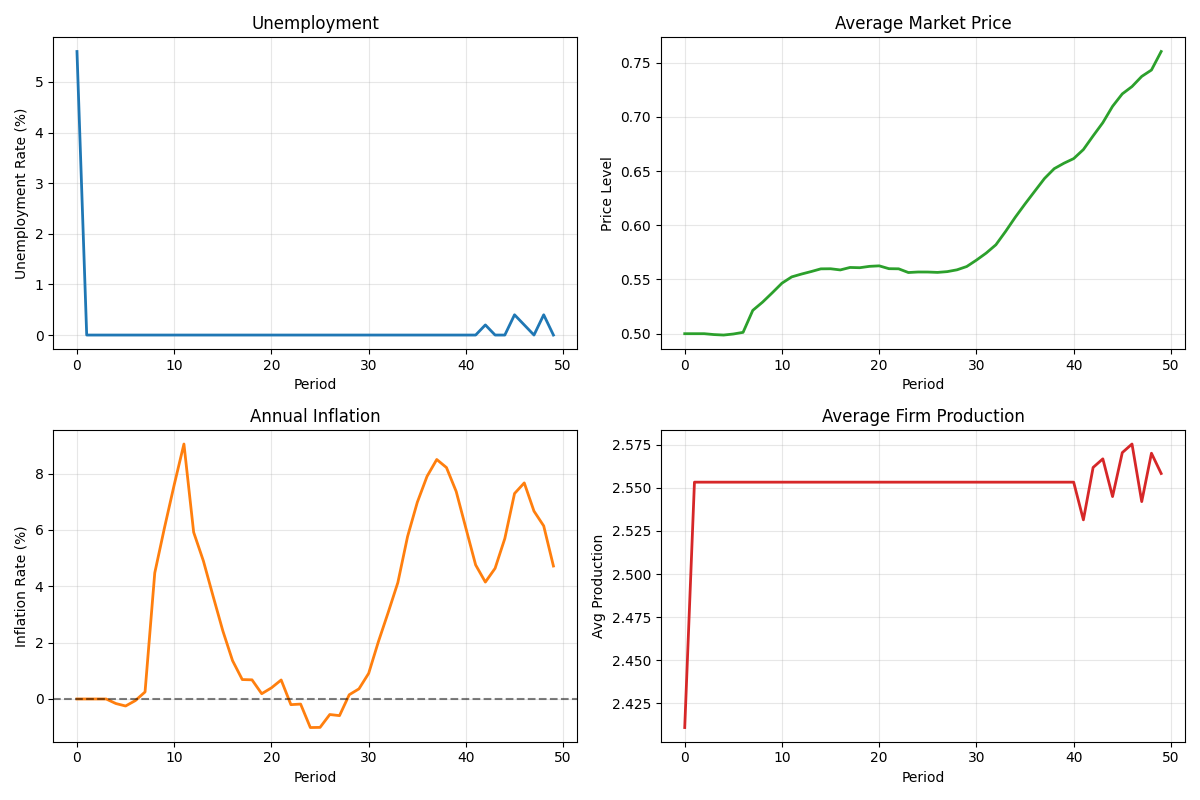
Visualizing Results#
Plot key economic indicators over time.
import matplotlib.pyplot as plt

fig, axes = plt.subplots(2, 2, figsize=(12, 8))

# Unemployment rate
ax1 = axes[0, 0]
if len(unemployment) > 0:
    ax1.plot(unemployment * 100, linewidth=2, color="tab:blue")
    ax1.set_ylabel("Unemployment Rate (%)")
    ax1.set_title("Unemployment")
    ax1.grid(True, alpha=0.3)

# Average price
ax2 = axes[0, 1]
if len(avg_price) > 0:
    ax2.plot(avg_price, linewidth=2, color="tab:green")
    ax2.set_ylabel("Price Level")
    ax2.set_title("Average Market Price")
    ax2.grid(True, alpha=0.3)

# Inflation
ax3 = axes[1, 0]
if len(inflation) > 0:
    ax3.plot(inflation * 100, linewidth=2, color="tab:orange")
    ax3.set_ylabel("Inflation Rate (%)")
    ax3.set_title("Annual Inflation")
    ax3.axhline(y=0, color="black", linestyle="--", alpha=0.5)
    ax3.grid(True, alpha=0.3)

# Production - compute mean across firms since data is 2D
ax4 = axes[1, 1]
production_data = results["Producer.production"]
# Average across firms (axis=1) since data is (periods, firms)
avg_production = np.mean(production_data, axis=1)
ax4.plot(avg_production, linewidth=2, color="tab:red")
ax4.set_ylabel("Avg Production")
ax4.set_title("Average Firm Production")
ax4.grid(True, alpha=0.3)

for ax in axes.flat:
    ax.set_xlabel("Period")

plt.tight_layout()
plt.show()
Custom Data Collection#
Use a dictionary to specify exactly what data to collect.
Keys are role names (or “Economy”), values are True for all variables
or a list of specific variable names.
# Collect only specific roles (economy metrics are always included automatically)
custom_results = bam.Simulation.init(n_firms=100, n_households=500, seed=42).run(
    n_periods=30,
    collect={
        "Producer": True,  # All Producer variables
        "Worker": True,  # All Worker variables
        "aggregate": "mean",  # Average across agents
    },
)

print("Custom collection:")
print(f"  Roles collected: {list(custom_results.role_data.keys())}")
Custom collection:
  Roles collected: ['Producer', 'Worker']
Full Agent-Level Data#
Dict-form collect returns full per-agent data by default (larger arrays).
# Warning: This collects full arrays - can be memory intensive!
full_results = bam.Simulation.init(n_firms=50, n_households=250, seed=42).run(
    n_periods=20,
    collect={
        "Producer": ["price", "production"],  # Specific variables only
    },
)

prices_full = full_results["Producer.price"]
print(f"Full price data shape: {prices_full.shape}")
print(f"  (periods x firms): ({prices_full.shape[0]} x {prices_full.shape[1]})")

# Access individual firm's price history
firm_0_prices = prices_full[:, 0]
print(f"Firm 0 price history: {firm_0_prices[:5].round(3)}...")
Full price data shape: (20, 50)
  (periods x firms): (20 x 50)
Firm 0 price history: [0.5 0.5 0.5 0.5 0.5]...
Export to pandas DataFrame#
Convert results to pandas DataFrames for further analysis. Note: pandas is an optional dependency.
try:
    import pandas

    # Run a new simulation for DataFrame export
    df_results = bam.Simulation.init(n_firms=100, n_households=500, seed=42).run(
        n_periods=50,
        collect=True,
    )

    # Get all data as a single DataFrame (aggregated)
    df = df_results.to_dataframe(aggregate="mean")
    print("Full DataFrame:")
    print(f"  Shape: {df.shape}")
    print(f"  Columns: {list(df.columns)[:5]}...")

    # Get economy metrics only
    df_economy = df_results.economy_metrics
    print("\nEconomy metrics DataFrame:")
    print(df_economy.head())

    # Get specific role data
    df_producer = df_results.get_role_data("Producer", aggregate="mean")
    print(f"\nProducer DataFrame columns: {list(df_producer.columns)}")

except ImportError:
    print("pandas not installed. Install with: pip install pandas")
Full DataFrame:
  Shape: (50, 50)
  Columns: ['Producer.production.mean', 'Producer.production_prev.mean', 'Producer.inventory.mean', 'Producer.expected_demand.mean', 'Producer.desired_production.mean']...

Economy metrics DataFrame:
        avg_price  inflation  n_firm_bankruptcies  n_bank_bankruptcies
period
0          0.5000        0.0                    3                    0
1          0.5000        0.0                    3                    0
2          0.5000        0.0                    3                    0
3          0.5000        0.0                    3                    0
4          0.4993        0.0                    3                    0

Producer DataFrame columns: ['Producer.production.mean', 'Producer.production_prev.mean', 'Producer.inventory.mean', 'Producer.expected_demand.mean', 'Producer.desired_production.mean', 'Producer.labor_productivity.mean', 'Producer.breakeven_price.mean', 'Producer.price.mean', 'Producer.prod_shock.mean', 'Producer.prod_mask_up.mean', 'Producer.prod_mask_dn.mean', 'Producer.price_shock.mean']
Summary Statistics#
Get descriptive statistics for all collected metrics.
try:
    import pandas  # noqa: F401 - check if pandas is installed

    summary_results = bam.Simulation.init(n_firms=100, n_households=500, seed=42).run(
        n_periods=100,
        collect=True,
    )

    # Get summary statistics
    summary = summary_results.summary
    print("Summary Statistics:")
    print(summary[["mean", "std", "min", "max"]].round(4))

except ImportError:
    print("pandas not installed for summary statistics")
Summary Statistics:
                                       mean      std       min       max
Producer.production.mean             2.4760   0.1204    2.2038    2.6269
Producer.production_prev.mean        2.4760   0.1204    2.2038    2.6269
Producer.inventory.mean              0.4588   0.2348    0.0000    0.8617
Producer.expected_demand.mean        2.4208   0.1341    2.1307    2.6259
Producer.desired_production.mean     2.4208   0.1341    2.1307    2.6259
Producer.labor_productivity.mean     0.5000   0.0000    0.5000    0.5000
Producer.breakeven_price.mean        0.4973   0.0943    0.0000    0.6197
Producer.price.mean                  0.7392   0.1604    0.5010    0.9675
Producer.prod_shock.mean             0.0500   0.0026    0.0437    0.0585
Producer.prod_mask_up.mean           0.3261   0.2360    0.0100    1.0000
Producer.prod_mask_dn.mean           0.2293   0.1083    0.0000    0.4200
Producer.price_shock.mean            0.0496   0.0027    0.0441    0.0593
Worker.employer.mean                42.2989  13.5160    1.6520   50.4040
Worker.employer_prev.mean           43.9607  12.4924   -1.0000   48.9120
Worker.wage.mean                     0.2339   0.0829    0.0107    0.3503
Worker.periods_left.mean             3.5029   1.9318    0.0600    6.5900
Worker.contract_expired.mean         0.1139   0.2641    0.0000    0.9400
Worker.fired.mean                    0.0022   0.0063    0.0000    0.0360
Worker.job_apps_head.mean           -1.0000   0.0000   -1.0000   -1.0000
Employer.desired_labor.mean          5.1209   0.3911    4.3600    5.9700
Employer.current_labor.mean          4.2857   1.3260    0.3000    5.0000
Employer.wage_offer.mean             0.2646   0.0407    0.1682    0.3259
Employer.wage_bill.mean              1.3187   0.2453    0.8054    1.7740
Employer.n_vacancies.mean            0.2661   0.2427    0.0000    1.1200
Employer.total_funds.mean           12.2919   1.9966    7.7255   15.8609
Employer.wage_shock.mean             0.0110   0.0064    0.0022    0.0267
Borrower.net_worth.mean             12.2919   1.9966    7.7255   15.8609
Borrower.total_funds.mean           12.2919   1.9966    7.7255   15.8609
Borrower.wage_bill.mean              1.3187   0.2453    0.8054    1.7740
Borrower.credit_demand.mean          0.0025   0.0129    0.0000    0.1020
Borrower.projected_fragility.mean    0.0179   0.0581    0.0000    0.4504
Borrower.gross_profit.mean           0.0762   0.1082   -0.0929    0.3913
Borrower.net_profit.mean             0.0760   0.1081   -0.0932    0.3913
Borrower.retained_profit.mean        0.0510   0.1027   -0.1144    0.3521
Borrower.loan_apps_head.mean        -0.1178   1.4605   -1.0000    5.9200
Lender.equity_base.mean              3.9662   1.1033    2.0669    5.0012
Lender.credit_supply.mean           39.6654  11.1486   20.4475   50.0000
Lender.interest_rate.mean            0.0208   0.0006    0.0187    0.0216
Lender.opex_shock.mean               0.0495   0.0092    0.0307    0.0818
Consumer.income.mean                 0.0000   0.0000    0.0000    0.0000
Consumer.savings.mean                0.2682   0.1526    0.1158    0.9335
Consumer.income_to_spend.mean        0.0000   0.0000    0.0000    0.0000
Consumer.propensity.mean             0.7723   0.0247    0.6639    0.8162
Consumer.largest_prod_prev.mean     45.4211   6.8881   33.3360   60.1140
Consumer.shop_visits_head.mean     499.0000   0.0000  499.0000  499.0000
Shareholder.dividends.mean           0.0050   0.0018    0.0018    0.0086
avg_price                            0.7325   0.1577    0.4970    0.9519
inflation                            0.0198   0.0333   -0.0424    0.0771
n_firm_bankruptcies                  3.9200   2.7217    0.0000   11.0000
n_bank_bankruptcies                  0.0700   0.2564    0.0000    1.0000
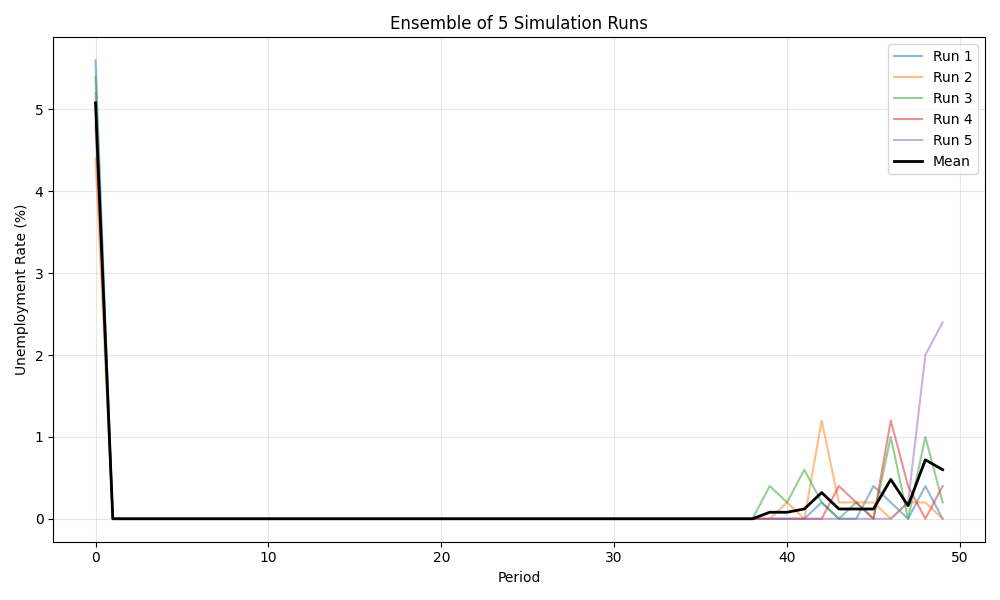
Comparing Multiple Simulation Runs#
Run multiple simulations and compare their results.
# Run with different random seeds
n_runs = 5
all_unemployment = []

print("Running ensemble of simulations...")
for i in range(n_runs):
    run_results = bam.Simulation.init(n_firms=100, n_households=500, seed=42 + i).run(
        n_periods=50,
        collect={
            "Worker": ["employed"],
            "capture_timing": {"Worker.employed": "firms_run_production"},
        },
    )
    # Calculate unemployment from Worker employed data
    unemp_rate = calc_unemployment_rate(run_results["Worker.employed"])
    all_unemployment.append(unemp_rate)

# Plot ensemble results
if all_unemployment:
    fig, ax = plt.subplots(figsize=(10, 6))

    for i, unemp in enumerate(all_unemployment):
        ax.plot(bam.ops.multiply(unemp, 100), alpha=0.5, label=f"Run {i + 1}")

    # Calculate and plot mean unemployment across runs
    # Stack arrays and compute mean along axis 0
    stacked = bam.ops.asarray([list(u) for u in all_unemployment])
    mean_unemployment = bam.ops.multiply(bam.ops.mean(stacked, axis=0), 100)
    ax.plot(mean_unemployment, "k-", linewidth=2, label="Mean")

    ax.set_xlabel("Period")
    ax.set_ylabel("Unemployment Rate (%)")
    ax.set_title(f"Ensemble of {n_runs} Simulation Runs")
    ax.legend(loc="upper right")
    ax.grid(True, alpha=0.3)
    plt.tight_layout()
    plt.show()

    # Summary across runs
    final_rates = bam.ops.asarray([unemp[-1] * 100 for unemp in all_unemployment])
    print("\nFinal unemployment rates:")
    print(f"  Mean: {bam.ops.mean(final_rates):.2f}%")
    print(f"  Std:  {bam.ops.std(final_rates):.2f}%")
    print(f"  Range: {bam.ops.min(final_rates):.2f}% - {bam.ops.max(final_rates):.2f}%")
Running ensemble of simulations...

Final unemployment rates:
  Mean: 0.36%
  Std:  0.37%
  Range: 0.00% - 1.00%
Collecting Relationship Data#
Relationships (like LoanBook) can be collected alongside role data.
Unlike roles, relationships are opt-in only and NOT included with collect=True.
# Manually add some loans to demonstrate relationship data collection
rel_sim = bam.Simulation.init(n_firms=50, n_households=250, seed=42)
loans = rel_sim.get_relationship("LoanBook")
loans.append_loans_for_lender(
    lender_idx=np.intp(0),
    borrower_indices=np.array([0, 1, 2, 3, 4], dtype=np.int64),
    amount=np.array([1000.0, 1500.0, 2000.0, 500.0, 750.0]),
    rate=np.array([0.02, 0.03, 0.025, 0.018, 0.022]),
)

rel_results = rel_sim.run(
    n_periods=20,
    collect={
        "Producer": ["price"],  # Role data
        "LoanBook": ["principal", "rate", "debt"],  # Relationship data
        "aggregate": "sum",  # Sum across all active loans
    },
)

print("Relationship data collection:")
print(f"  Available: {rel_results.available()}")

# Access via bracket notation
total_principal = rel_results["LoanBook.principal"]
print(f"  Total principal over time shape: {total_principal.shape}")
print(f"  Initial total principal: {total_principal[0]:.2f}")

# Access via get()
total_debt = rel_results.get("LoanBook", "debt")
print(f"  Total debt (last period): {total_debt[-1]:.2f}")
Relationship data collection:
  Available: ['Economy.avg_price', 'Economy.inflation', 'Economy.n_bank_bankruptcies', 'Economy.n_firm_bankruptcies', 'LoanBook.debt', 'LoanBook.principal', 'LoanBook.rate', 'Producer.price']
  Total principal over time shape: (20,)
  Initial total principal: 0.00
  Total debt (last period): 0.00
Analyzing Loan Distribution#
Without aggregation (the default for dict-form collect), you get full edge data per period as variable-length arrays. Useful for analyzing distributions but cannot be exported to DataFrame.
loan_dist_sim = bam.Simulation.init(n_firms=50, n_households=250, seed=42)
loans = loan_dist_sim.get_relationship("LoanBook")
# Add loans with varying amounts
loans.append_loans_for_lender(
    lender_idx=np.intp(0),
    borrower_indices=np.array([0, 1, 2], dtype=np.int64),
    amount=np.array([100.0, 200.0, 300.0]),
    rate=np.array([0.02, 0.03, 0.025]),
)

dist_results = loan_dist_sim.run(
    n_periods=5,
    collect={
        "LoanBook": ["principal"],  # Full edge data (variable-length per period)
    },
)

principal_per_period = dist_results["LoanBook.principal"]
print("\nLoan distribution (full per-edge data):")
print(f"  Type: {type(principal_per_period).__name__}")
print(f"  Number of periods: {len(principal_per_period)}")
if principal_per_period:
    print(f"  Period 0 loans: {len(principal_per_period[0])} active")
    print(f"  Period 0 principals: {principal_per_period[0]}")
Loan distribution (full per-edge data):
  Type: list
  Number of periods: 5
  Period 0 loans: 0 active
  Period 0 principals: []
Key Takeaways#
Basic collection:
Use
collect=True(the default) for full per-agent data collectionEconomy metrics are always collected automatically
Use
collect={"Producer": ["price"]}for specific variablesUse
Truefor all variables:{"Worker": True}
Data access (primary API):
results["Producer.price"]– bracket notation (recommended)results.Producer.price– attribute access (interactive use)results.get("Producer", "price")– programmatic accessresults.get("Producer", "price", aggregate="mean")– with aggregationresults.available()– discover all collected variables
Per-agent data and capture timing:
Dict-form
collectreturns full per-agent data by default (shape: periods x agents)Use
capture_timingto control when variables are captured during each periodExample:
"capture_timing": {"Worker.employed": "firms_run_production"}
Computing derived metrics:
Unemployment rate can be computed from
Worker.employed:1.0 - np.mean(employed.astype(float), axis=1)When computing from per-agent data, aggregate across agents with
axis=1
Relationship data:
Relationships (like
LoanBook) are opt-in: use"LoanBook": ["principal"]NOT included with
collect=True(must specify explicitly)Aggregations:
sum(total),mean(average),std(variation)Without aggregation (default): list of variable-length arrays (can’t export to DataFrame)
Access via
results["LoanBook.principal"]orresults.get("LoanBook", "principal")
Legacy access (still works):
results.economy_data,results.role_data,results.relationship_dataresults.datafor unified dict access (includes “Economy” key and relationships)Export to pandas with
to_dataframe()for further analysisGet quick statistics with
results.summary
Total running time of the script: (0 minutes 7.275 seconds)