

Note
Go to the end to download the full example code.
Custom Events#
This example demonstrates how to create custom events (systems) to extend BAM Engine with new economic mechanisms. Custom events can implement policies, shocks, regulations, or any periodic process.
You’ll learn to:
Define events using the
@eventdecoratorImplement the
execute()methodAccess simulation state (roles, economy, config)
Use the
opsmodule for array operationsRegister and use custom events in pipelines
What are Events?#
In BAM Engine’s ECS architecture:
Events are systems that execute during each simulation period
They read and modify roles (agent state)
They run in a specific order defined by the pipeline
Events implement economic mechanisms like wage setting, hiring, production.
import bamengine as bam
from bamengine import event, get_event, logging, ops

# Check built-in events
print("Sample built-in events:")
for name in [
    "firms_decide_desired_production",
    "firms_adjust_price",
    "workers_receive_wage",
]:
    try:
        e = get_event(name)
        print(f"  {name}")
    except KeyError:
        print(f"  {name}: not registered")
Sample built-in events:
  firms_decide_desired_production
  firms_adjust_price: not registered
  workers_receive_wage
Simple Custom Event#
The @event decorator creates an event class automatically.
You just need to implement the execute() method.
@event
class ApplyPriceFloor:
    """Enforce a minimum price level (price floor policy).

    This event prevents prices from falling below a threshold,
    simulating a price support policy.
    """

    def execute(self, sim: bam.Simulation) -> None:
        """Execute the price floor policy.

        Parameters
        ----------
        sim : Simulation
            The simulation instance with access to all state.
        """
        # Access the Producer role
        prod = sim.get_role("Producer")

        # Get minimum price from config or use default
        min_price = getattr(sim.config, "price_floor", 0.5)

        # Apply floor: price = max(price, min_price)
        ops.assign(prod.price, ops.maximum(prod.price, min_price))


print("\nApplyPriceFloor event created!")
print(f"  Registered as: {ApplyPriceFloor.name}")

# Verify registration
floor_event = get_event("apply_price_floor")
print(f"  Retrieved: {floor_event is ApplyPriceFloor}")
ApplyPriceFloor event created!
  Registered as: apply_price_floor
  Retrieved: True
Event with Logging#
Good events log their actions for debugging and analysis.
@event
class TaxCollection:
    """Collect corporate taxes from firms.

    Implements a simple proportional tax on firm net worth.
    Demonstrates logging and economy state access.
    """

    def execute(self, sim: bam.Simulation) -> None:
        # Get logger for this event
        logger = logging.getLogger("bamengine.events.tax_collection")
        logger.info("Collecting corporate taxes...")

        # Access borrower role (has net worth)
        borr = sim.get_role("Borrower")

        # Tax rate (could come from config)
        tax_rate = 0.05  # 5% tax on positive net worth

        # Calculate tax only on positive net worth
        positive_nw = ops.maximum(borr.net_worth, 0.0)
        tax_amount = ops.multiply(positive_nw, tax_rate)

        # Total tax collected
        total_tax = ops.sum(tax_amount)

        # Log details
        logger.debug(f"Tax rate: {tax_rate:.1%}")
        logger.debug(f"Total tax collected: {total_tax:.2f}")
        logger.debug(f"Firms taxed: {ops.sum(ops.greater(tax_amount, 0))}")

        # Apply tax (reduce net worth)
        borr.net_worth[:] = borr.net_worth - tax_amount

        logger.info(f"Tax collection complete. Revenue: {total_tax:.2f}")


print("\nTaxCollection event with logging:")
print(f"  Registered as: {TaxCollection.name}")
TaxCollection event with logging:
  Registered as: tax_collection
Event Using Random Numbers#
Access sim.rng for reproducible random operations.
@event
class ProductivityShock:
    """Apply random productivity shocks to firms.

    Simulates exogenous productivity changes from technology
    adoption, learning, or random events.
    """

    def execute(self, sim: bam.Simulation) -> None:
        logger = logging.getLogger("bamengine.events.productivity_shock")

        prod = sim.get_role("Producer")

        # Shock parameters
        shock_probability = 0.1  # 10% chance of shock per firm
        shock_magnitude = 0.05  # Up to 5% productivity change

        # Determine which firms get shocked
        n_firms = len(prod.labor_productivity)
        shock_mask = sim.rng.random(n_firms) < shock_probability

        if ops.any(shock_mask):
            # Generate random shocks (positive or negative)
            shocks = ops.uniform(sim.rng, -shock_magnitude, shock_magnitude, n_firms)

            # Apply only to shocked firms
            multipliers = ops.where(shock_mask, 1.0 + shocks, 1.0)

            # Update productivity
            prod.labor_productivity[:] = prod.labor_productivity * multipliers

            n_shocked = ops.sum(shock_mask)
            logger.info(f"Applied productivity shocks to {n_shocked} firms")
        else:
            logger.debug("No productivity shocks this period")


print("\nProductivityShock event using RNG:")
print(f"  Registered as: {ProductivityShock.name}")
ProductivityShock event using RNG:
  Registered as: productivity_shock
Event Accessing Multiple Roles#
Most real events need data from multiple roles.
@event
class WageSubsidy:
    """Government wage subsidy program for low-wage workers.

    Subsidizes wages below a threshold, transferring funds
    from a government budget to households.
    """

    def execute(self, sim: bam.Simulation) -> None:
        logger = logging.getLogger("bamengine.events.wage_subsidy")

        # Access multiple roles
        wrk = sim.get_role("Worker")
        cons = sim.get_role("Consumer")

        # Subsidy parameters
        wage_threshold = (
            sim.ec.min_wage * 1.5
        )  # Subsidy for wages below 150% of min wage
        subsidy_rate = 0.2  # 20% top-up

        # Find eligible workers (employed with low wages)
        employed = wrk.employer >= 0
        low_wage = ops.less(wrk.wage, wage_threshold)
        eligible = ops.logical_and(employed, low_wage)

        if ops.any(eligible):
            # Calculate subsidy amounts
            subsidy = ops.where(eligible, ops.multiply(wrk.wage, subsidy_rate), 0.0)

            # Add to consumer income (same indices as workers)
            cons.income[:] = cons.income + subsidy

            total_subsidy = ops.sum(subsidy)
            n_beneficiaries = ops.sum(eligible)

            logger.info(
                f"Wage subsidy: {n_beneficiaries} workers received "
                f"total {total_subsidy:.2f}"
            )
        else:
            logger.debug("No workers eligible for wage subsidy")


print("\nWageSubsidy event accessing multiple roles:")
print(f"  Registered as: {WageSubsidy.name}")
WageSubsidy event accessing multiple roles:
  Registered as: wage_subsidy
Event with Configuration Parameters#
Events can read custom parameters from simulation config.
@event
class CapitalRequirementShock:
    """Sudden increase in bank capital requirements.

    Simulates a regulatory shock like Basel III implementation.
    Demonstrates reading custom config parameters.
    """

    def execute(self, sim: bam.Simulation) -> None:
        logger = logging.getLogger("bamengine.events.capital_requirement_shock")

        # Check if shock should apply this period
        shock_period = getattr(sim.config, "capital_shock_period", -1)

        if sim.t != shock_period:
            return  # Not the shock period

        # Get shock magnitude from config
        new_requirement = getattr(sim.config, "new_capital_requirement", 0.10)
        old_requirement = sim.config.v

        logger.warning(
            f"REGULATORY SHOCK: Capital requirement "
            f"{old_requirement:.1%} -> {new_requirement:.1%}"
        )

        # Update the parameter (note: this modifies config for rest of run)
        # In practice, you might want a separate state variable
        lend = sim.get_role("Lender")

        # Banks must reduce credit supply
        reduction_factor = old_requirement / new_requirement
        lend.credit_supply[:] = lend.credit_supply * reduction_factor

        logger.info(f"Bank credit supply reduced by factor {reduction_factor:.2f}")


print("\nCapitalRequirementShock with config parameters:")
print(f"  Registered as: {CapitalRequirementShock.name}")
CapitalRequirementShock with config parameters:
  Registered as: capital_requirement_shock
Running Custom Events#
Custom events can be executed directly on a simulation.
# Initialize simulation
sim = bam.Simulation.init(n_firms=50, n_households=250, seed=42)

# Run a few periods to establish state
sim.run(n_periods=10)

# Access roles via get_role() for cleaner API
prod = sim.get_role("Producer")
borr = sim.get_role("Borrower")

print("\nBefore custom events:")
print(f"  Mean price: {ops.mean(prod.price):.3f}")
print(f"  Mean net worth: {ops.mean(borr.net_worth):.2f}")

# Execute custom events directly
price_floor_event = ApplyPriceFloor()
price_floor_event.execute(sim)

tax_event = TaxCollection()
tax_event.execute(sim)

print("\nAfter custom events:")
print(f"  Mean price: {ops.mean(prod.price):.3f} (floor applied)")
print(f"  Mean net worth: {ops.mean(borr.net_worth):.2f} (taxes paid)")
Before custom events:
  Mean price: 0.498
  Mean net worth: 10.30

After custom events:
  Mean price: 0.505 (floor applied)
  Mean net worth: 9.79 (taxes paid)
Event with Custom Name#
Specify a custom registration name with the name parameter.
@event(name="government_spending_shock")
class GovernmentSpendingShock:
    """Fiscal stimulus through increased government spending.

    Registered with custom name 'government_spending_shock'.
    """

    def execute(self, sim: bam.Simulation) -> None:
        logger = logging.getLogger("bamengine.events.government_spending_shock")

        # Add income to all households (helicopter money)
        cons = sim.get_role("Consumer")
        stimulus_per_household = 10.0

        cons.income[:] = cons.income + stimulus_per_household

        total_stimulus = stimulus_per_household * len(cons.income)
        logger.info(f"Government spending: {total_stimulus:.2f} distributed")


# Verify custom name
print("\nEvent with custom name:")
print("  Class name: GovernmentSpendingShock")
print("  Registered as: government_spending_shock")

gov_event = get_event("government_spending_shock")
print(f"  Retrieved: {gov_event is GovernmentSpendingShock}")
Event with custom name:
  Class name: GovernmentSpendingShock
  Registered as: government_spending_shock
  Retrieved: True
Visualizing Event Effects#
Compare simulations with and without a custom event.
import matplotlib.pyplot as plt

# Simulation without tax
sim_no_tax = bam.Simulation.init(n_firms=100, n_households=500, seed=42)
borr_no_tax = sim_no_tax.get_role("Borrower")
nw_no_tax = []
for _ in range(50):
    sim_no_tax.step()
    nw_no_tax.append(ops.mean(borr_no_tax.net_worth))

# Simulation with tax (manual execution each period)
sim_with_tax = bam.Simulation.init(n_firms=100, n_households=500, seed=42)
borr_with_tax = sim_with_tax.get_role("Borrower")
nw_with_tax = []
tax_event = TaxCollection()
for _ in range(50):
    sim_with_tax.step()
    tax_event.execute(sim_with_tax)  # Collect taxes after each period
    nw_with_tax.append(ops.mean(borr_with_tax.net_worth))

# Plot comparison
fig, ax = plt.subplots(figsize=(10, 6))
ax.plot(nw_no_tax, label="Without Tax", linewidth=2)
ax.plot(nw_with_tax, label="With 5% Tax", linewidth=2)
ax.set_xlabel("Period")
ax.set_ylabel("Mean Firm Net Worth")
ax.set_title("Effect of Corporate Tax on Firm Net Worth")
ax.legend()
ax.grid(True, alpha=0.3)
plt.tight_layout()
plt.show()

# Print final comparison
print("\nFinal mean net worth:")
print(f"  Without tax: {nw_no_tax[-1]:.2f}")
print(f"  With tax: {nw_with_tax[-1]:.2f}")
print(f"  Difference: {nw_no_tax[-1] - nw_with_tax[-1]:.2f}")
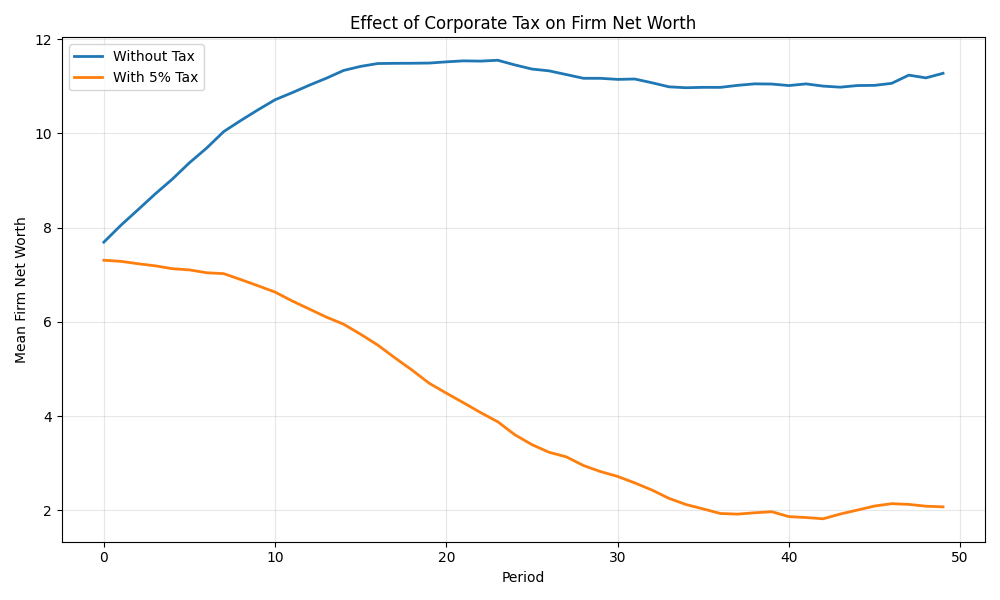
Final mean net worth:
  Without tax: 11.24
  With tax: 2.09
  Difference: 9.15
Traditional Syntax (Alternative)#
The @event decorator is sugar. You can also use explicit inheritance.
from dataclasses import dataclass

from bamengine.core import Event


@dataclass(slots=True)
class TraditionalEvent(Event):
    """Event using traditional explicit syntax."""

    def execute(self, sim: bam.Simulation) -> None:
        pass  # Implementation here


print("\nTraditional syntax event:")
print(f"  Is subclass of Event: {issubclass(TraditionalEvent, Event)}")
Traditional syntax event:
  Is subclass of Event: True
Practical Example: Unemployment Insurance#
A realistic policy implementation.
@event
class UnemploymentInsurance:
    """Unemployment insurance payments to jobless workers.

    Implements a realistic UI system with:
    - Eligibility based on employment status
    - Benefit rate as fraction of average wage
    - Duration limits (simplified)
    """

    def execute(self, sim: bam.Simulation) -> None:
        logger = logging.getLogger("bamengine.events.unemployment_insurance")

        wrk = sim.get_role("Worker")
        cons = sim.get_role("Consumer")

        # UI parameters
        replacement_rate = 0.4  # 40% of average wage
        benefit = sim.ec.min_wage * replacement_rate

        # Find unemployed workers
        unemployed = wrk.employer < 0
        n_unemployed = ops.sum(unemployed)

        if n_unemployed > 0:
            # Pay benefits
            ui_payment = ops.where(unemployed, benefit, 0.0)
            cons.income[:] = cons.income + ui_payment

            total_paid = benefit * n_unemployed

            logger.info(
                f"UI payments: {n_unemployed} recipients, total {total_paid:.2f}"
            )


print("\nUnemploymentInsurance - realistic policy event:")
print(f"  Registered as: {UnemploymentInsurance.name}")
UnemploymentInsurance - realistic policy event:
  Registered as: unemployment_insurance
Key Takeaways#
Use
@eventdecorator for clean event definitionImplement
execute(self, sim)methodAccess roles via
sim.get_role("RoleName")Use
opsmodule for array operationsUse
sim.rngfor reproducible randomnessAdd logging for debugging and analysis
Events register automatically with snake_case names
Can execute events manually or add to pipeline (see pipeline example)
Total running time of the script: (0 minutes 1.444 seconds)